
Wi-Meter1.0 - Google Play
You'll be able to see results in few seconds.
Publisher Description
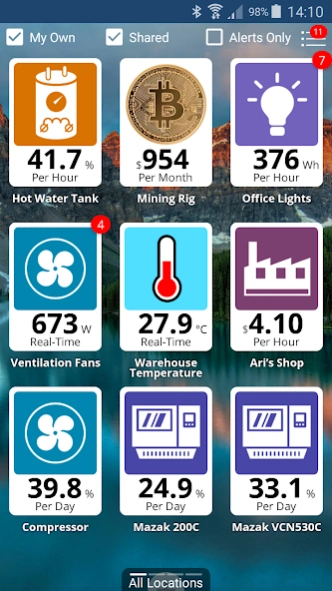
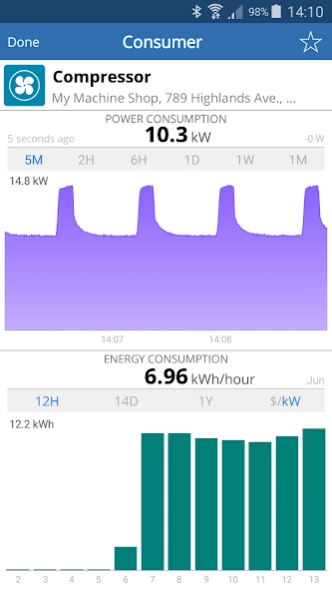
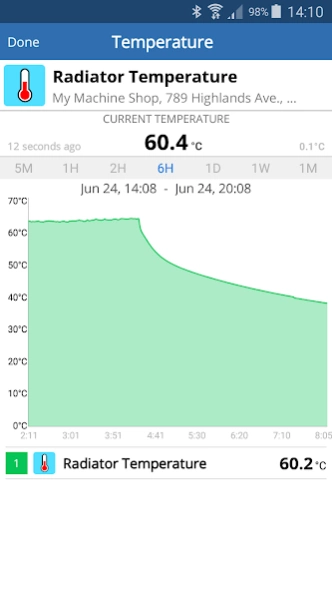

Circuit-level power monitoring with preemptive equipment failure alerts
Wi-Meter is a Wi-Fi connected smart electrical power meter and critical systems monitor. It saves your money by identifying energy wasting devices and proactively monitoring the health of your equipment, minimizes the downtime, and gives you a full picture of energy consumption.
Wi-Meter installs on any circuit breaker panel or a splitter box and constantly monitors the power consumption of your electrical equipment. It has 28 channels of power measurement and supports up to 4 temperature sensors.
Wi-Meter sends you mobile and desktop alerts about equipment malfunction, thus preventing equipment failure and saving you money. You can set up your own alerts on any of the power consumers and temperature sensors.
Some unique features that make Wi-Meter superior to other power monitors:
- It goes beyond electrical power metering. With its ability to read other sensors, such as the temperature, it allows you to "health check" your equipment.
- It has a sharing feature. You can share any of the channels in Wi-Meter with other people.
- Several Wi-Meters can be combined into one system. It supports sub-metering.
- There is no "Always On" group of unidentified devices. It knows exactly what's always on, because it reads multiple individual circuits separately.
- It works immediately after installation. There is no guessing or learning required.
- It works with all residential and commercial electrical panels, with 1, 2 or 3 phases, and with voltages between 100 and 600V.
About Wi-Meter
The company that develops Wi-Meter is Digital Sign Technologies Inc.. The latest version released by its developer is 1.0.
To install Wi-Meter on your Android device, just click the green Continue To App button above to start the installation process. The app is listed on our website since 2020-03-19 and was downloaded 0 times. We have already checked if the download link is safe, however for your own protection we recommend that you scan the downloaded app with your antivirus. Your antivirus may detect the Wi-Meter as malware as malware if the download link to com.digitalsigntechnologies.wi_meter is broken.
How to install Wi-Meter on your Android device:
- Click on the Continue To App button on our website. This will redirect you to Google Play.
- Once the Wi-Meter is shown in the Google Play listing of your Android device, you can start its download and installation. Tap on the Install button located below the search bar and to the right of the app icon.
- A pop-up window with the permissions required by Wi-Meter will be shown. Click on Accept to continue the process.
- Wi-Meter will be downloaded onto your device, displaying a progress. Once the download completes, the installation will start and you'll get a notification after the installation is finished.
Program Details
System requirements
Download information
Pricing
Version History
version 1.0
posted on 2020-03-20
- Rate setup support.
- Event markers added to graph views.
- Stability fixes and performance enhancements.
version 1.0
posted on 2020-02-29
Stability updates.
version 1.0
posted on 2020-02-21
- Board setup fixes.
- Misc bug fixes and improvements.
- Improved locations configuration support.
version 1.0
posted on 2019-12-31
Login fix.
version 1.0
posted on 2019-07-02
Wi-Meter debut for Android.
Disclaimer
Official Google Play Link
We do not host Wi-Meter on our servers. We did not scan it for viruses, adware, spyware or other type of malware. This app is hosted by Google and passed their terms and conditions to be listed there. We recommend caution when installing it.
The Google Play link for Wi-Meter is provided to you by apps112.com without any warranties, representations or guarantees of any kind, so access it at your own risk.
If you have questions regarding this particular app contact the publisher directly. For questions about the functionalities of apps112.com contact us.
